The AI assistant is disabled by default. It only works with your key (BYOK): Voaaro neither provides nor resells AI.
Providers
In order of preference for keeping your emails with you:
- A model hosted by you, free: any OpenAI-compatible server (Ollama, LM Studio…) on your network. Check "Allow a local provider" in Appearance and features › AI assistant (private addresses are refused without this explicit choice). For user or organization keys, also add the server to the allowed hosts, with its port:
127.0.0.1:11434for Ollama,[::1]:8080for IPv6. A host written without a port only opens port 443. - An online provider: Anthropic (Claude), or any OpenAI-compatible service (OpenAI, Mistral…), pay as you go.
Modes
| Mode | Key used |
|---|---|
| disabled (default) | none |
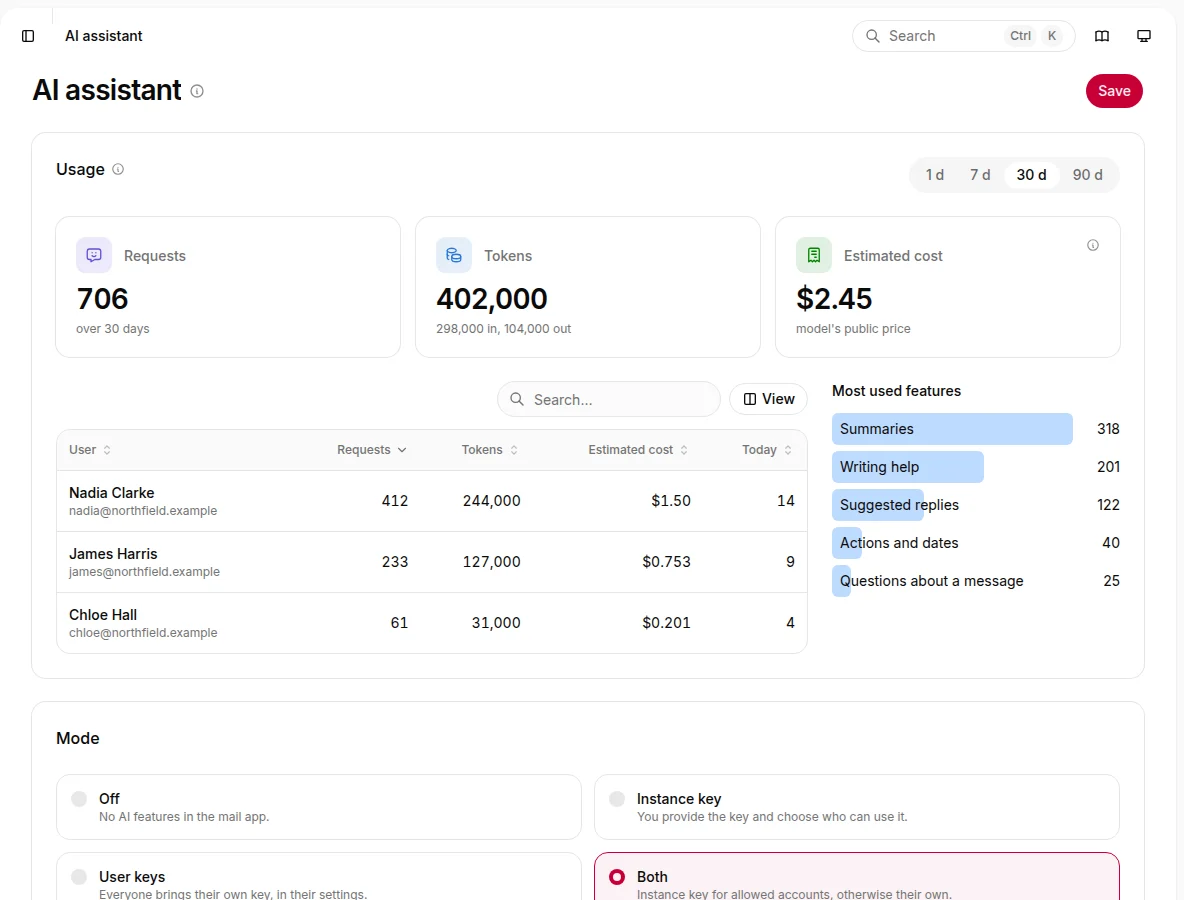
| organization key | for authorized accounts, domains or roles, with a cap per account and per day (requests and tokens) |
| user keys | each user brings their own (Settings › AI assistant), to the hosts the administrator allows |
| both | the organization key for authorized accounts, otherwise the user's |
Features
The features only run when someone asks: summarize a conversation, suggest three replies, help with writing (write, rephrase, shorten, translate, correct) in the webmail and in the template editor, extract actions and dates (to tasks and the calendar), "Ask my mailbox".
Security
Keys are encrypted at rest and never sent back to the interface (only their last 4 characters). Changing the provider erases the key: it never goes to another host. Usage (tokens, estimated cost) is tracked per user.