The webmail encrypts and signs your messages with OpenPGP, the standard used by GnuPG, Thunderbird, Proton and many other programs. Everything happens in your browser: the text, the attachments and your unlocked private key never go through the server. It is included in every instance, with nothing to install or pay for.
What the server sees, and what it doesn't
| Visible to the server | Never visible | |
|---|---|---|
| Your key | public key, fingerprint; private key encrypted with your passphrase | passphrase, unlocked private key |
| An encrypted message | sender, recipients, subject, date, size | text, formatting, attachments |
| An encrypted draft | same | same (it is encrypted to you) |
The private key is kept on the server so it follows you on all your devices, protected with Argon2id (RFC 9580): a copy of the database does not let anyone guess your passphrase cheaply. It is only unlocked in the browser, in memory, and forgotten when you lock it, after 30 minutes of inactivity and when you sign out.
As with any webmail, this protection assumes that the server serving you the page has not been compromised. For the most sensitive secrets, also use an installed program (Thunderbird, GnuPG) with the same key, exported from Voaaro.
Create or import your key
Settings › Security › End-to-end PGP encryption:
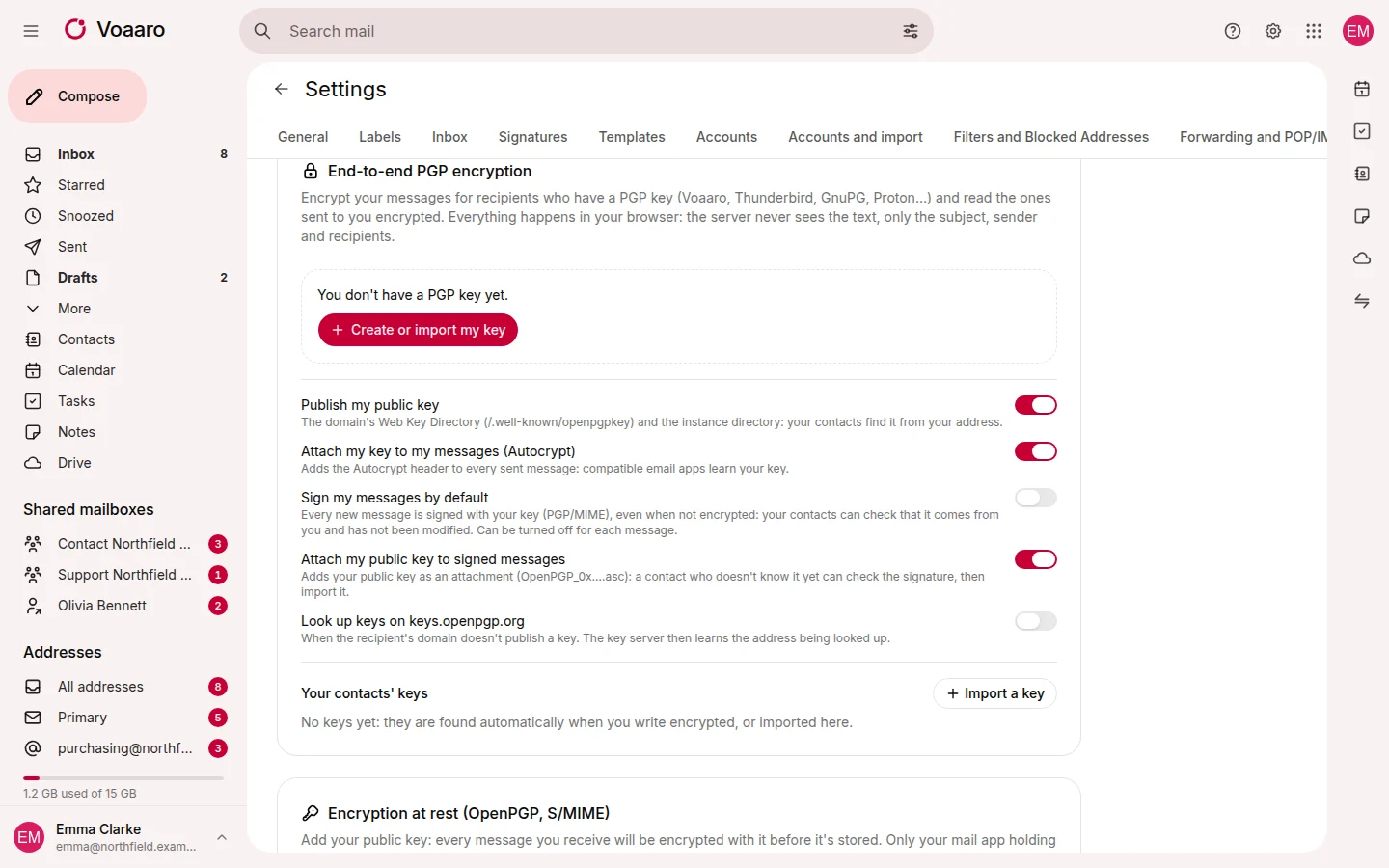
- Create a key: Ed25519 / X25519 (recommended) or RSA 4096, for your address.
- or Import my key: paste your private key (ASCII armor) and its current passphrase.
- Choose a strong passphrase. Voaaro does not know it and cannot recover it.
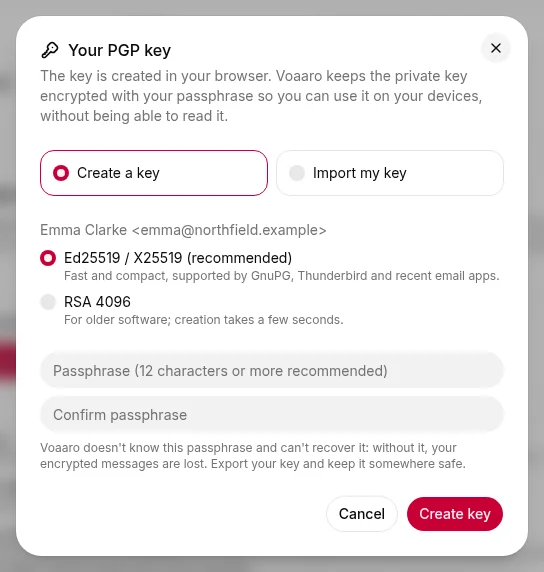
Then export your key ("Private key" button) and keep the file somewhere safe: GnuPG and Thunderbird can read it.
Other actions: show the fingerprint, export the public key, change the passphrase, revoke the key (the revocation is published, the key stays to read old messages), replace it with a new one.
Publish your key
- Web Key Directory (WKD), on by default: the instance publishes your public key at
https://<your domain>/.well-known/openpgpkey/hu/…. GnuPG, Thunderbird and Proton find it from your address. For the "advanced" method, pointopenpgpkey.<your domain>at the Voaaro server (CNAME record and TLS certificate). The same setting publishes the key in the instance directory: your colleagues find it without doing anything. - Autocrypt (optional): every message you send carries your key in the
Autocryptheader. - File: "Public key" downloads an
.ascfile you can attach to a message.
Write an encrypted message
In the compose window, the "Encrypt (PGP)" padlock button:
- Voaaro looks up each recipient's key: your key book, the instance directory, the recipient domain's WKD, then keys.openpgp.org (can be turned off: that service then learns the address looked up). Sending is refused while a key is missing.
- Sign: on by default; asks for your passphrase if the key is locked.
- The message is encrypted to the recipients and to you (readable copy in "Sent"), in the PGP/MIME format (RFC 3156) that every OpenPGP program reads.
- Drafts are encrypted to you every time they are saved: never in clear on the server, and you can reopen them on any device.
- Attachments stay in the browser and are encrypted with the message (20 MB in total).
- Not available in confidential mode (a different mode, see below), with the visual editor or offline.
Sign without encrypting
The "Sign (PGP)" button, next to the padlock, is independent from encryption: signed only, encrypted only, or both. A message that is signed but not encrypted stays readable by everyone (servers included), but every recipient with OpenPGP can check that it really comes from you and was not modified on the way.
- The signature is made in your browser, with your private key, when you send (passphrase asked if the key is locked). The key never leaves the browser.
- PGP/MIME format (
multipart/signed, RFC 3156), the one used by Thunderbird and GnuPG. The text, formatting and attachments are inside the signed part; neither Voaaro nor the mail server touches it afterwards (no footer, no tracking, no re-encoding), otherwise the signature would no longer verify. - Attach my key: adds your public key (
OpenPGP_0x….asc) to the message, for a contact who doesn't know it yet. - Settings › Security: "Sign my messages by default" (every new message is signed, can be turned off per message) and "Attach my public key to signed messages".
- Not available in confidential mode, with the visual editor or offline (a message is sent once the network is back only if it is not signed).
Read an encrypted or signed message
An encrypted message opens with your key, after the passphrase if it is locked. A message that is only signed shows right away, even without a PGP key: the signature is checked in your browser. A banner shows:
- End-to-end encrypted (PGP);
- Valid signature from …, with "fingerprint verified" if you compared it with your contact; "key attached to the message" if the key was only known from the attachment ("Import key" adds it to your contacts);
- Invalid signature: the message may have been altered;
- Signature from an unknown key: "Look up key".
PGP/MIME messages, "inline" blocks (-----BEGIN PGP MESSAGE-----) and clear-signed texts are supported. The decrypted text stays in the page: it is never sent back to the server nor kept in the offline copy. So search does not find the text of encrypted messages, only their subject, sender and recipients.
Your contacts' keys
On a contact's card, "PGP keys" section, and in Settings › Security: the key of each address, where it came from (WKD, keys.openpgp.org, Autocrypt, import), Verify (compare the fingerprint with your contact, in person or by phone), Import a key, Delete. A key received through Autocrypt never replaces a key you imported or verified.
With encryption at rest
Encryption at rest encrypts every received message with your public key before storing it. "Use for encryption at rest" button: your Voaaro PGP key serves both, and those messages remain readable in the webmail, decrypted in the browser. With another program's key, they can only be read in that program.
Confidential mode and PGP
| Confidential mode | End-to-end PGP | |
|---|---|---|
| Recipient | anyone (link to a secure page) | someone with an OpenPGP key |
| Where the text is | on the Voaaro server (sealed or password-encrypted) | in the message, encrypted to the recipients' keys |
| Expiry, revocation | yes | no (the message is with the recipient) |
| The server reads the text | yes in confidential mode, no in password mode | never |