This guide walks, in order, through everything needed to open an "alternative to Gmail" mail service on your domain, next to your business customers. Each step links to the page with the details. Allow half a day, plus DNS propagation and Stripe verification time.
1. Prepare
- Two domains. The public domain (for example
brightmail.example) belongs to users only; your team keeps another domain (northfield.example). Add and verify both in Domains and DNS (MX, SPF, DKIM, DMARC). - DMARC. Start with
p=noneand arua=you read (aggregate reports in DMARC reports), then move top=quarantineonce the reports are clean. - Reputation. Register the public domain with Google Postmaster Tools and Microsoft SNDS. The domain is shared by all users: abuse affects all of it, hence the importance of caps (step 5).
- Installation.
scripts/install.shcreates the read-only PostgreSQL rolevoaaro_engine(variableVOAARO_ENGINE_LOOKUP_PASSWORD): without it, the mail server cannot enforce the per-plan SMTP sending cap. On an older installation, runscripts/install.shagain with the same options: it adds the role without touching anything else. - Legal texts. Prepare your terms of service, privacy policy and abuse procedure (templates below, step 7) and publish them on your site: the terms link is required to open sign-up.
2. Run the wizard
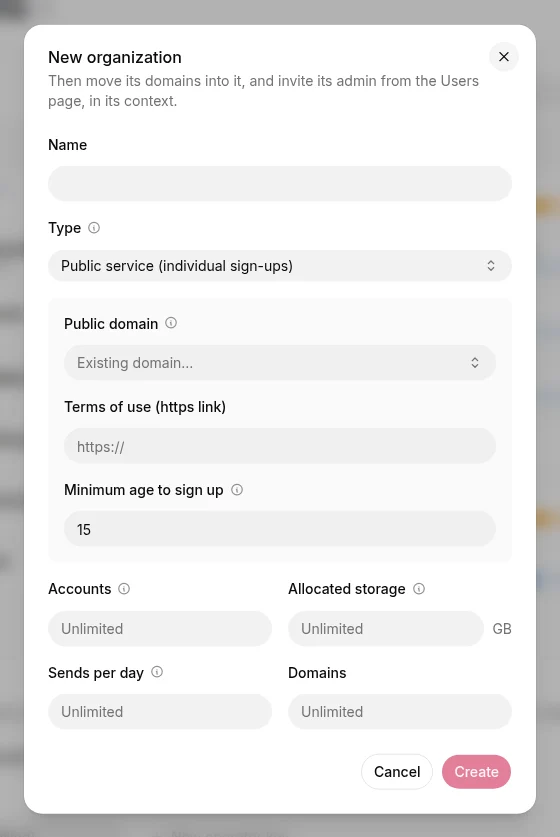
Overview › Organizations › New organization, type Public service: public domain, terms link, minimum age (15 suggested). The wizard places the domain in the organization, creates the Free plan, opens sign-up and creates the domain's abuse@ shared mailbox (you are a member). Details: Public service and plans.
3. Define the plans
Plans and subscriptions › Plans: for each plan, storage, recipients per day and per message, secondary addresses, shared files, AI assistant, devices (IMAP, SMTP) after probation, personal API keys, import, personal domains and newsletters. Starting advice:
- a cautious free plan: 100 recipients per day, 20 per message, 7 days of probation with no device or API key;
- the free plan is optional: without it, every sign-up goes through a payment;
- short addresses (fewer than 6 characters) are reserved for paid plans.
4. Connect Stripe
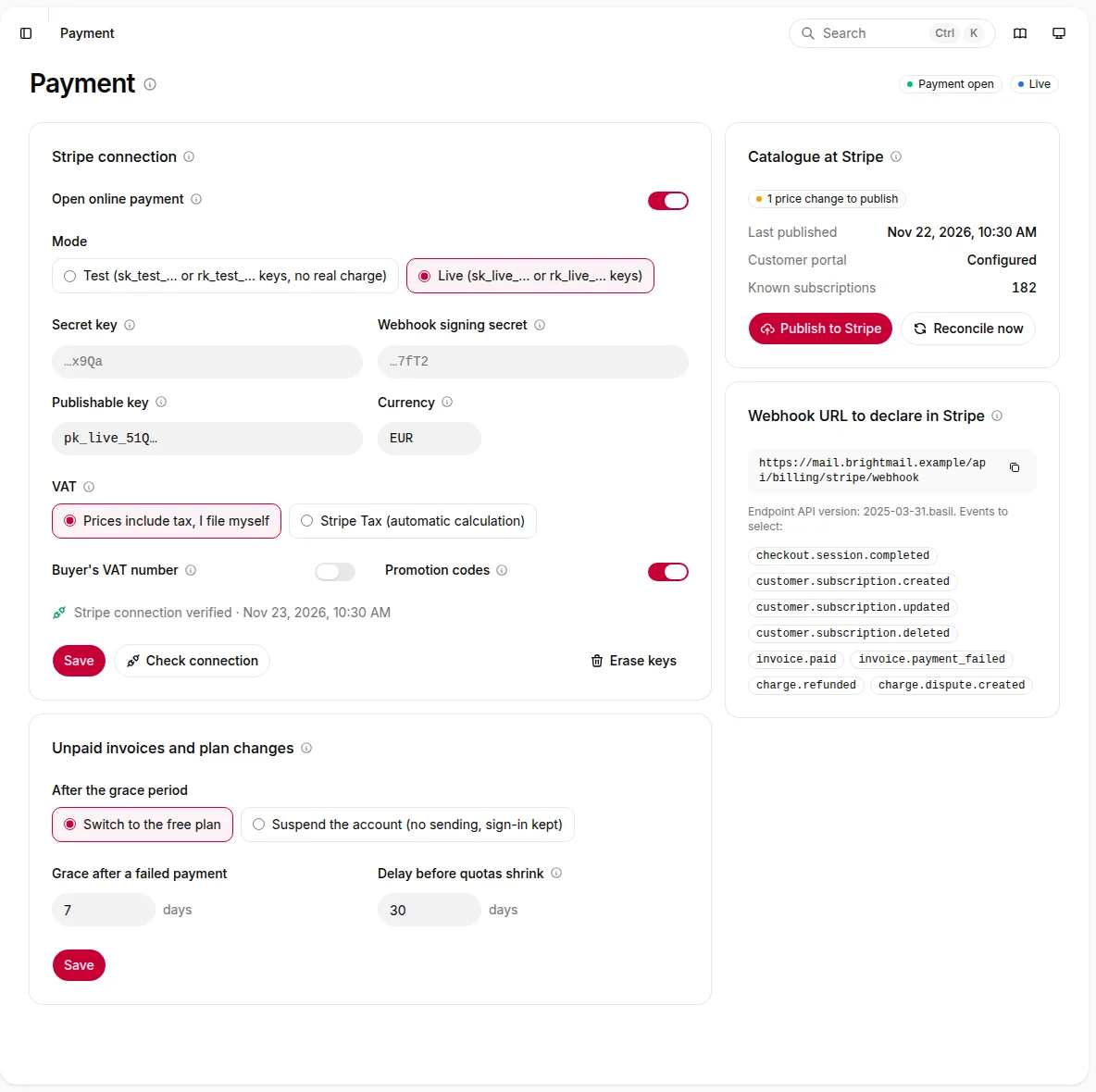
With your Stripe account (unrelated to your Voaaro licence): a restricted key rk_test_…, a webhook endpoint with the ten events listed on the Payment page, prices per plan, Publish to Stripe, then tests in test mode (card 4242 4242 4242 4242) before going live. Also set the grace period after a failed payment and the downgrade period. Details: Public service subscriptions (Stripe).
VAT and taxes. Voaaro computes no tax. Depending on your country and your subscribers', you may have to collect VAT (including on digital services sold abroad): choose Tax-inclusive prices (you file yourself) or Stripe Tax, and have this choice checked by your accountant.
5. Tune anti-abuse
Already active when you open: a code sent to an external address (one free account per address), adaptive proof of work, per-network limits, sensitive names refused, per-plan sending caps enforced in SMTP too by the mail server, automatic suspension (repeated overruns, hard bounces, complaints), the public /#signaler form. To do:
- add your brands to
signup.brand_namesand known disposable domains tosignup.disposable_domains; - read Accounts to review and the
abuse@mailbox daily; answer reports within 24 hours; - link
/#signalerfrom your site and your terms.
6. Look after deliverability
- Outbound IPs: in Domains and deliverability › IPs and reputation, one IP per traffic type, with its reverse DNS and warm-up. Tick Mail of paying accounts on a separate IP: paying users' mail does not suffer from a blacklisted free IP.
- Personal domain: a plan with Personal domains lets the subscriber send from their own domain (their own DKIM keys, their own reputation).
- Watch blacklists (Health alerts) and DMARC reports.
7. Legal texts
The repository provides templates to be reviewed by a lawyer in docs/legal/modeles-operateur/: terms of service, privacy policy, abuse handling procedure (in French). They follow what the software does (retention, deletion, addresses never reassigned, audit log, Stripe); your obligations depend on your country: adapt them, do not publish them as is. Also think of your record of processing and your site's legal notice.
8. Lifecycle and personal data
In the public service, export and self-service deletion (14-day cooling-off) are always open; a deletion also stops the Stripe subscription. Set the audit log retention (12 to 36 months) and, if you wish, deletion of inactive free accounts. A legal hold blocks a deletion on request from the authorities. Details: Account export and deletion.
9. Check before opening
- [ ] Public domain DNS all green, DMARC read, reverse DNS of each IP equal to its name.
- [ ] A test sign-up with a real external address: the code arrives, the mailbox opens.
- [ ] A send beyond the free plan's cap is refused (webmail and SMTP).
- [ ] A report on
/#signalerlands in Accounts to review. - [ ] In Stripe test mode: a subscription, a plan change, a cancellation, a simulated failed payment.
- [ ] An export and a deletion of a test account.
- [ ] Terms, privacy policy and abuse procedure published and linked.
- [ ] Live Stripe keys entered by you alone, catalogue published again in live mode.
Then
Follow Subscribers and Revenue in Plans and subscriptions, the Accounts to review queue and the Health page. A reputation or abuse issue: start with the free plans' caps.