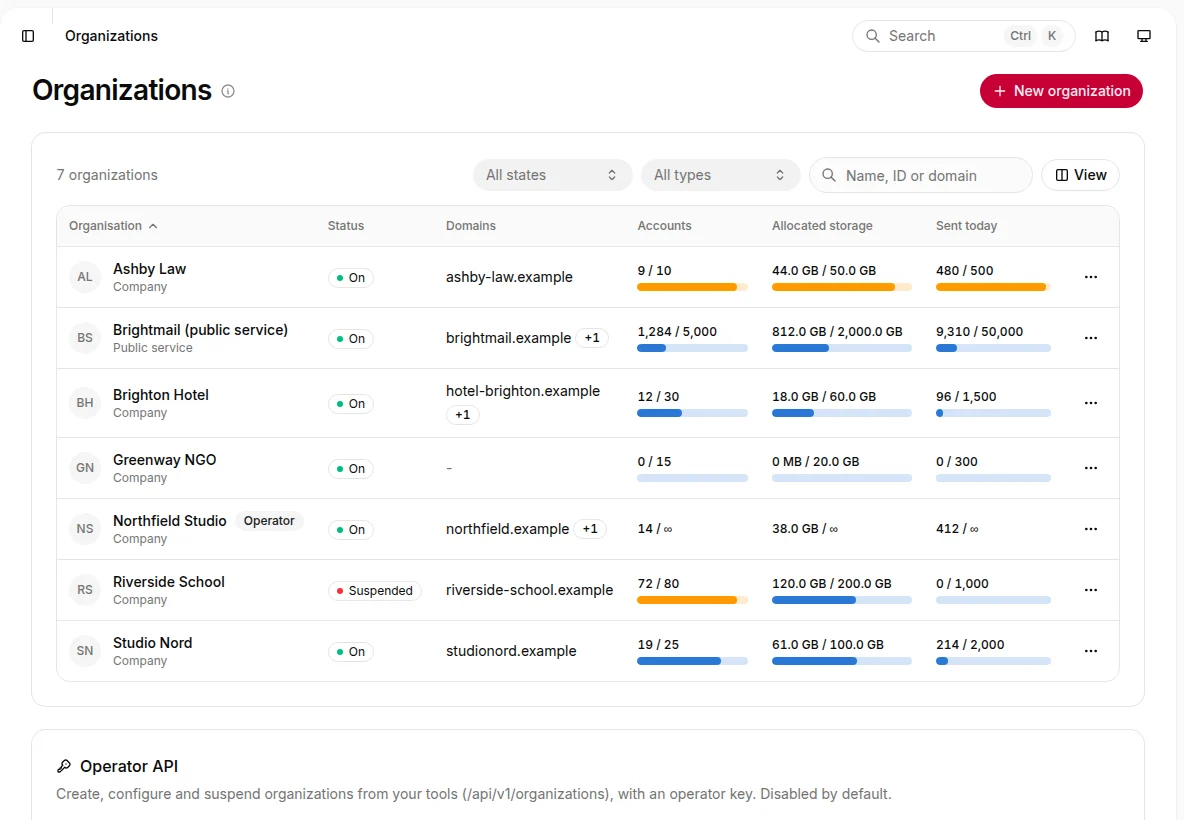
A Voaaro instance can host several organizations: an agency or an integrator hosts its client companies on it. Each organization has its domains, accounts, admins, settings, newsletters and API keys, and never sees the others.
As long as only one organization exists (the operator's, created at installation), nothing changes: the Overview › Organizations page is the only addition.
Everything follows the domain
An organization owns domains. A domain's accounts, shared mailboxes, invitations, API keys, campaigns and contacts, sending logs and statistics belong to its organization. Moving an existing domain into an organization brings all of that along.
Create an organization
- Overview › Organizations › New organization: name, type (Company, or Public service for individual sign-ups: see Public service and plans), quotas.
- Open it, then Move into this organization an existing domain, or add a domain to it from Domains and DNS in its context.
- Manage in its context, then Users › Invite with the Organization admin role.
Quotas
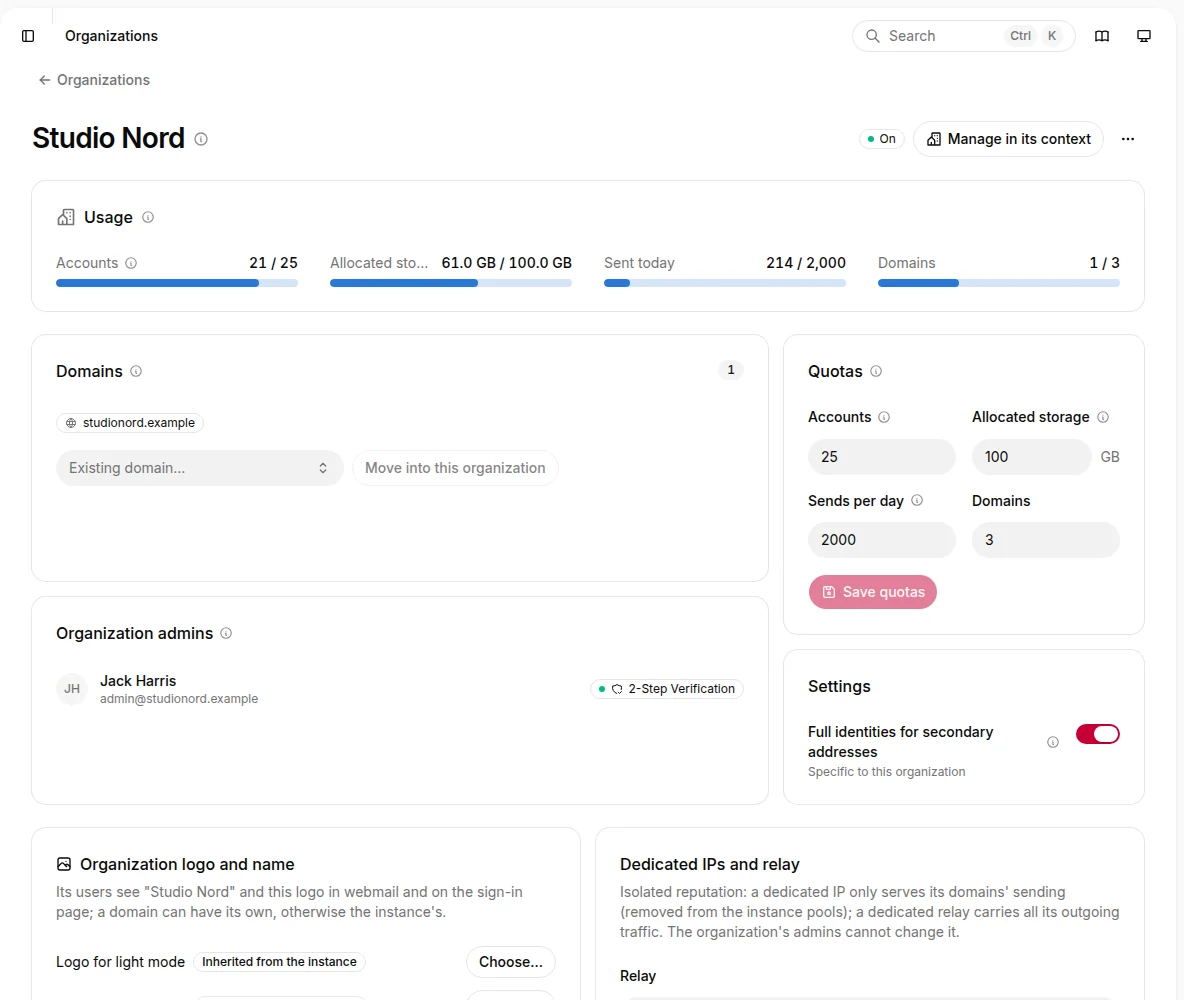
| Quota | Checked |
|---|---|
| Accounts | on every invitation, sign-up or shared mailbox (open invitations count) |
| Allocated storage | on every account and storage change (each account then has a limit) |
| Sends per day | on every message sent, by webmail or API |
| Domains | on every domain added or moved |
Empty: unlimited. Usage is shown in the list, on the organization's page and on its admins' dashboard.
Organization admin
They have the whole administration of their organization: domains, accounts, shared mailboxes, sign-ups, roles, API keys, templates, sending log, statistics, newsletters, appearance. They see neither the other organizations nor the instance settings (licence, updates, health, backups, storage, outbound IPs, audit log). Like every administrator, they must enable two-factor authentication.
Operator
- Organization context: at the top of the administration, the Whole instance / Alpha / Beta picker limits every page to one organization (the domain context nests inside it).
- Sign in as its admin: one hour, with a Back to my account banner; start and end go to the audit log.
- Suspend: accounts can no longer sign in (webmail, IMAP, SMTP), API keys no longer respond; Reactivate restores everything. The operator's organization cannot be suspended.
- Full identities for secondary addresses: configurable per organization (otherwise, the instance setting).
Specific to each organization
- AI key: its admin can enter their provider's key (Appearance and features › AI assistant); the organization's accounts use it, without the instance's daily cap. Without it, the instance key is used, according to the operator's rules.
- Logo and name: in Appearance and features › Appearance, its admin picks a logo (light and dark). Its users see this logo, or otherwise the organization's name, in webmail and on the sign-in page. A domain can have its own logo; otherwise the organization's, otherwise the instance's.
- Audit log: its admins read their organization's events (Security › Audit log); the operator sees everything.
- Dedicated IPs and relay: on the organization's page, the operator can dedicate outbound IPs (removed from other sending) or a relay to it, for a separate sending reputation. The organization's admins cannot change it. An IP attached to a cluster server only serves that server (multiple servers); if the dedicated relay fails, mail waits, leaves through the IPs or through a backup relay, as you choose (relays).
Operator API
To create and manage organizations from your tools (billing, customer portal), enable Organizations › Operator API and create an operator key (mko_…). It only works on the /api/v1/organizations routes (list, create, update, quotas, suspend, reactivate, move a domain); it sends no email, and a sending key does not open them. See the API reference and the SDKs.
The key is tied to the person who created it: it is revoked when that account is suspended or deleted, or when it loses the right to manage organizations. Each revocation is recorded in the audit log. If the app must keep working after someone leaves, create the key from an operator account that stays.
Isolation
Isolation is enforced by the service: every permission has a scope of domains, and an organization admin's scope is all the domains of their organization.